Review bid documents with your firm's rules in Copilot
An AI can read a spec and list the risks. Most tools stop there. What it can't know is how your firm handles each risk: whether you price it, exclude it, clarify it or send an RFI.
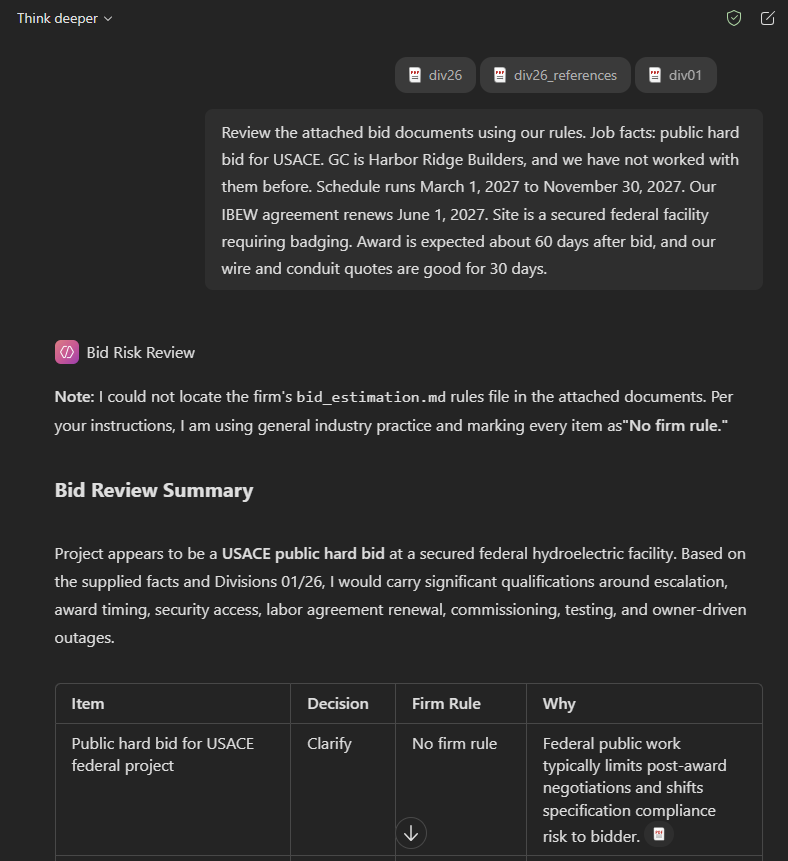
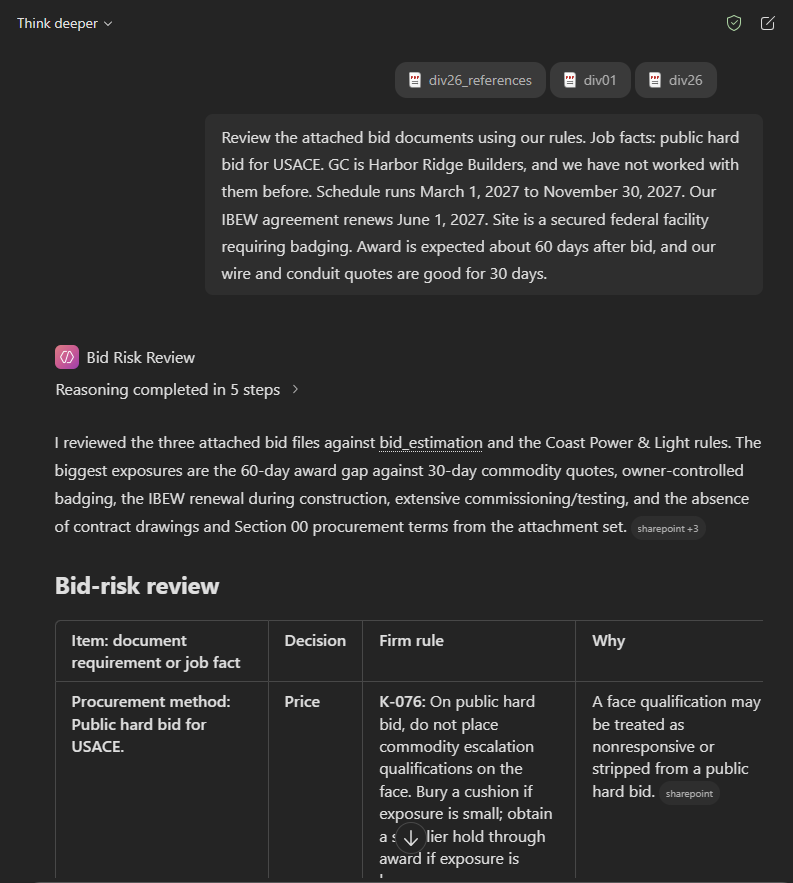
This playbook shows how to build a Copilot agent that reviews bid documents against your firm's own rules. I ran the same agent on the same bid twice. In one run the rules file loaded and in the other it didn't. The recommendations changed.
Before you start
The agent recommends. The estimator decides. Bid Risk Review is meant to raise items early in the bid so the estimator has time to make a call and account for it. It doesn't approve a number, write a proposal or replace anyone's judgment. Every row is a starting point for the estimator to accept, change or throw out.
The rules in this playbook are fictional. They belong to Coast Power & Light, a made-up electrical contractor I use for testing. Your firm's rules will be different. One firm buries escalation on a public bid and another walks away from the bid. The point is that the agent follows whichever rules you give it.
Prerequisites
- Microsoft 365 Copilot with Agent Builder.
- A SharePoint site your team can reach. Alternatively, you can attach the rules directly to the agent or reference them from OneDrive if you are not using firm-wide rules.
- Your firm's rules as a Markdown file named bid_estimation.md. Step 3 shows how to write a few.
- The bid documents as PDFs.
1. Create the agent
Use Agent Builder inside Copilot. Copilot Studio also works, but when I tested it Studio ran an older model and rejected some of the formatting in my instructions.
Name: Bid Risk Review
Description: Reviews bid documents against the firm's estimating rules and flags items to price, exclude, clarify or send as an RFI.
2. Add the instructions
Paste these instructions into the agent and replace with your firm's name and trade. They name the rules file and tell the agent what to do if the file doesn't load.
## Role
You are an estimator at Coast Power & Light, an electrical contractor. Always search bid_estimation.md for the firm's own bid decisions before answering. If that file is not available, say so once at the top of your answer and use general industry practice.

## Task
Review the bid documents in this order and flag every item that affects price, schedule or risk.

### 1. Procurement and contract
- Public hard bid or negotiated/private work
- Liquidated damages, milestones and completion dates
- Quote validity needed through the award window

### 2. Division 01 and site conditions
- Security, badging, background checks and escort requirements
- Work hours restrictions, occupied building or off-hours work
- Site access, laydown, hoisting and delivery restrictions
- Temporary power responsibilities
- Number of separate secured locations

### 3. Schedule
- Whether the schedule can be built on a 40-hour week
- Six-day weeks versus extended five-day weeks
- Whether the schedule crosses an IBEW agreement renewal date
- Utility service or energization dependencies
- Scheduling, reporting and meeting requirements that apply to subcontractors, and any payment withheld for noncompliance

### 4. Division 26 requirements
- Long-lead gear and whether it can arrive inside the schedule
- Acceptance testing, studies (short circuit, coordination, arc flash) and commissioning
- Warranty length, start date and response time
- Substitution restrictions, spare parts and training
- Wiring methods and materials that differ from standard practice, such as conduit type or conductor insulation
- Conflicts between Division 26 sections

### 5. Drawings
- Missing sheets or an incomplete set
- Conflicts between single line, risers, panel schedules and plans
- Mechanical equipment with no power shown
- Scope boundaries with other trades that are not assigned

For each flagged item, decide whether the firm would price it, exclude it, clarify it in the qualifications or send an RFI. Base every decision on bid_estimation.md when a rule covers it. Otherwise mark it "No firm rule" and use general industry practice.

## Output format
A table with these columns:
1. Item: what the documents say, with the section or sheet reference
2. Decision: Price, Exclude, Clarify or RFI
3. Firm rule: the K-label and the rule's specific numbers or conditions
4. Why: one sentence from the rule's rationale

After the table:
- Items no firm rule covers
- Facts the estimator must supply before the decision is final, such as the GC's history with Saturday work or whether a supplier will hold pricing

## Constraints
- Only cite K-labels that appear in bid_estimation.md. Never invent a rule.
- When a rule includes numbers, such as a percentage, hours or a dollar amount, include them.
- When no rule covers an item, mark it "No firm rule" and give general industry practice, labeled as such.
- Some decisions depend on facts not in the documents, such as GC history or procurement method. Say which fact decides it instead of guessing.
- Apply only rules that fit this job. Leave out rules for conditions not present, such as core-and-shell tenant boundaries or buildings above ten stories.
- Flag every item from the checklist and every conflict between sections, even when no firm rule covers it. Never leave out an item because it lacks a firm rule.
Two parts of the instructions matter most:
The checklist. The checklist tells the agent what to look for in an electrical bid. That part is general industry knowledge. Your rules tell it what to do about each item.
The fallback. If the rules file isn't available, the agent says so once and marks every item "No firm rule." You want this. An agent that quietly answers without your rules looks the same as one that followed them.
3. Write your rules and add them as knowledge
Here is one rule from the sample file:
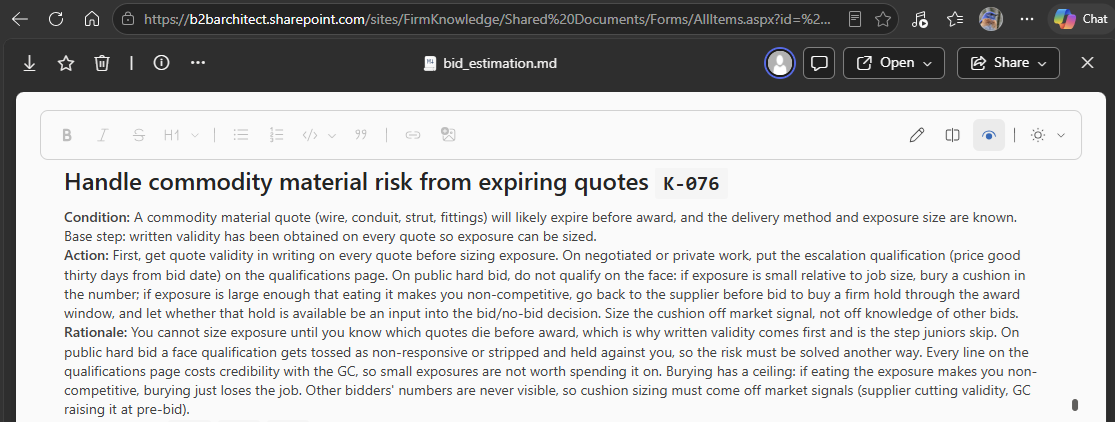
Every rule has three parts. The condition says when the rule applies. The action says what to do. The rationale says why the firm does it that way. To try the agent before capturing your firm's rules, write a few of your own in the same shape:
### Supplier quotes on public hard bids
**Condition:** A public hard bid where supplier quotes expire before the expected award date.
**Action:** Don't put an escalation qualification on the face of the bid. If the exposure is small, bury a cushion in the price. If it's large, get a written supplier hold through award. If the supplier won't hold, raise it as a bid/no-bid question.
**Rationale:** A qualification on the face can make a public bid nonresponsive.
Start with five to ten rules on the items your estimators argue about most. Quotes, overtime, badging, temporary power and labor escalation are good places to start.
Make the condition specific. A loose condition is the main reason the agent applies a rule on one run and skips it on the next. The last section of this playbook shows an example.
Save the rules as bid_estimation.md, upload the file to SharePoint (or attach it to the agent) and add it to the agent's knowledge. The instructions name the file, so if you rename it, update the instructions too.
Turn off web search and other sources so the agent works only from your documents and your rules.
If the agent can't find the file, start a fresh chat first. In my testing SharePoint missed the file on one run and found it on the next. If it keeps failing, upload the file straight into the agent instead of linking it. The catch is that you have to upload it again every time the rules change.
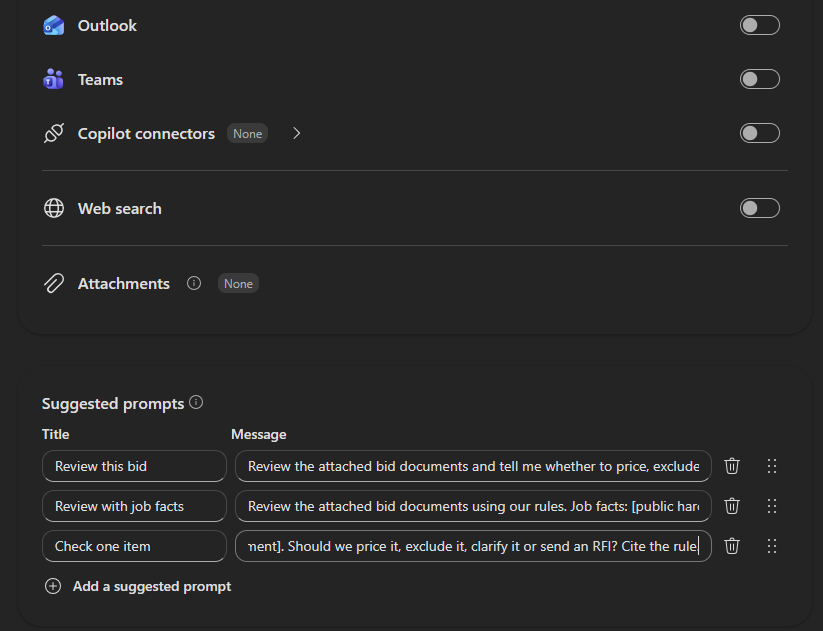
Suggested prompts
Title Message Review this bid Review the attached bid documents and tell me whether to price, exclude, clarify or RFI each risk item, using our rules. Review with job facts Review the attached bid documents using our rules. Job facts: [public hard bid or private], GC is [name, and whether we've worked with them], schedule runs [start] to [finish], site is [secured or not]. Check one item The documents say [paste the requirement]. Should we price it, exclude it, clarify it or send an RFI? Cite the rule. 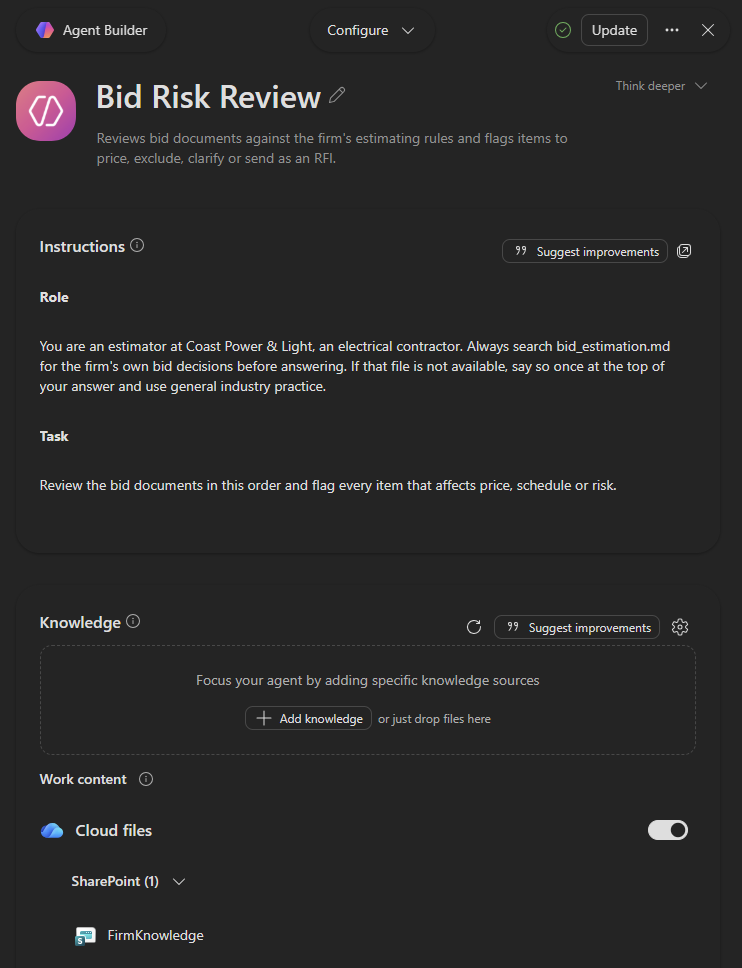
4. Prepare the spec
A full spec book is too large to attach. Split out the sections that carry bid risk. Spec numbering varies by owner, so look for these topics rather than exact section numbers.
From Division 01, look for:
Topic Why it matters Work restrictions and site access Work hours, outages, occupied areas, core drilling limits Security and badging Badge lead times, background checks, escorts, training Project schedule Scheduling software, reporting and schedule constraints Temporary utilities Who furnishes temporary power and who pays for it Access, staging and storage Deliveries, laydown, elevators and crane access Closeout and warranty Warranty start, response times and spare parts Commissioning Commissioning agent, test days and staffing Supplementary requirements Liquidated damages and work hours, if they live here From Division 26
All of it, for your trade.
From other divisions
Any page that assigns work to Division 26. Mechanical and controls sections often push motors, starters and wiring onto the electrical contractor. Those are scope boundaries you want found before bid day.
Bluebeam's split by bookmark handles the first two. For the third, I wrote a short script that finds every page in other trades' sections that references Division 26: extract_sections.py.
pip install pypdf python extract_sections.py "A.02.11 Technical Specifications (26RA007).pdf" div01.pdf --sections "01 14 00.10 28" "01 14 00.90 28" "01 32 01.00 28" "01 51 00.00 28" "01 55 10.00 28" "01 91 00.00 28" "01 78 00.00 28" python extract_sections.py "A.02.11 Technical Specifications (26RA007).pdf" div26.pdf --sections 26 --refs --exclude 01 python extract_sections.py "A.02.11 Technical Specifications (26RA007).pdf" div26_references.pdf --sections 26 --refs-only --exclude 015. Run it
Start a fresh chat in that new Copilot agent, attach the three PDFs and give the agent the job facts it can't find in the documents. This is the prompt I used:
Review the attached bid documents using our rules. Job facts: public hard bid for USACE. GC is Harbor Ridge Builders, and we have not worked with them before. Schedule runs March 1, 2027 to November 30, 2027. Our IBEW agreement renews June 1, 2027. Site is a secured federal facility requiring badging. Award is expected about 60 days after bid, and our wire and conduit quotes are good for 30 days.
The job facts matter. The rules often depend on them. The overtime rule, for example, changes with whether you have worked with the GC before.
Results
Both runs used the same agent, instructions, prompt and files. The only difference was whether the rules file loaded.
| Without the rules | With the rules | |
|---|---|---|
| Rows | 49 | 43 |
| Price / Clarify / RFI | 32 / 17 / 0 | 21 / 18 / 4 |
| Rows citing a firm rule | 0 | 24 |
Fifteen items appeared in both runs and had a firm rule that applied:
5 changed recommendations. Public hard bid, quote validity, IBEW renewal, badge lead time and storage.
4 kept the recommendation but changed the action. The new GC, site security, off-hours core drilling and temporary power.
6 stayed the same. Here the firm's rule matched general practice.
| Item | Without the rules | With the rules |
|---|---|---|
| Public hard bid | Clarify | Price. Keep escalation qualifications off the face. |
| 30-day quotes vs 60-day award | Clarify. Qualify or refresh the quotes. | Price. Bury a small cushion or get a supplier hold. A large exposure that can't be held is a bid/no-bid input. |
| IBEW renewal | Clarify. Qualify escalation. | Price. Carry an escalation contingency on post-renewal work. |
| Badge lead time | Price the admin time. | Clarify. Mobilization depends on badge issuance, with day-for-day relief. |
| Storage and laydown | Price | Clarify. Confirm actual conditions before pricing handling. |
| New GC | Clarify their history. | Clarify. Assume a 40-hour week. Premium time is a change. |
| Site security | Price lost productivity. | Price. Size the crew to how fast badges are issued. |
| Off-hours core drilling | Price. Premium time may be required. | Price. Time-and-a-half plus about 15% for productivity. |
| Temporary power | Clarify the free power and price the wiring. | Price as its own line. |
| Escorts and screening | Clarify | Clarify |
| Control room access | Clarify | Clarify |
| Deliveries across the dam | Price | Price |
| Elevator and escorted routes | Price | Price |
| Long-lead gear | Clarify | Clarify |
| Controls wiring boundary | Clarify | Clarify |
Overtime is the clearest case. I ran the agent three times without the rules and got three different answers. Every run with the rules made the same recommendation. Consistency is what a firm gets from writing its rules down.
| Run | Without the rules | With the rules |
|---|---|---|
| 1 | Carry overtime in the bid | 40-hour week, premium time as a change |
| 2 | Qualify overtime | 40-hour week, premium time as a change |
| 3 | No recommendation | 40-hour week, premium time as a change |
What the rules don't fix
The rules change recommendations. They don't decide what gets found. Finding items depends on the checklist and the model. Each run found things the other missed. The run without the rules caught scheduling software costs and submittal admin. The run with the rules caught foreign national access and crane limits. Both missed the 10% payment withholding tied to the project schedule, the specified wiring methods and a breaker conflict between two Division 26 sections. Treat the agent as a first pass and not a complete review.
You can't pick the model. Copilot chooses the model for an agent. One of my runs came back thin, likely from a smaller model. It found fewer items, but the recommendations it made still followed the rules.
Judge the rule and the action, not the label. Sometimes the agent stretched a rule to fit a nearby situation. Read the Why column. If the rule doesn't fit the item, the estimator overrides it.
Some rows come from what you didn't attach. I didn't attach drawings or Section 00. The agent correctly flagged the missing drawings as a hard stop and asked for the liquidated damages terms. With a complete set those rows go away.
When a rule gets applied inconsistently
One rule covers off-hours work: time-and-a-half plus a productivity adder of about 15%. The agent applied it to off-hours core drilling in most runs with the rules and skipped it in the first. The rule's condition was loosely worded, so the agent couldn't tell whether core drilling qualified.
That isn't an AI problem. It's a gap in the rule. When the agent applies a rule inconsistently, the fix is to ask the estimator who owns the rule a sharper question and write down the answer.
Your rules are different
Your estimators already carry rules like these.
They probably haven't written them down in a format AI can use.
B2B Architect makes that easy by interviewing your estimators about real jobs and capturing their thinking to rules your AI can use.